winpane
winpane
Section titled “winpane”Windows overlay SDK: HUDs, interactive panels, PiP thumbnails, tray icons. High-perf Rust core with bindings for TypeScript, C, Python, Go, Zig, and any language via JSON-RPC.





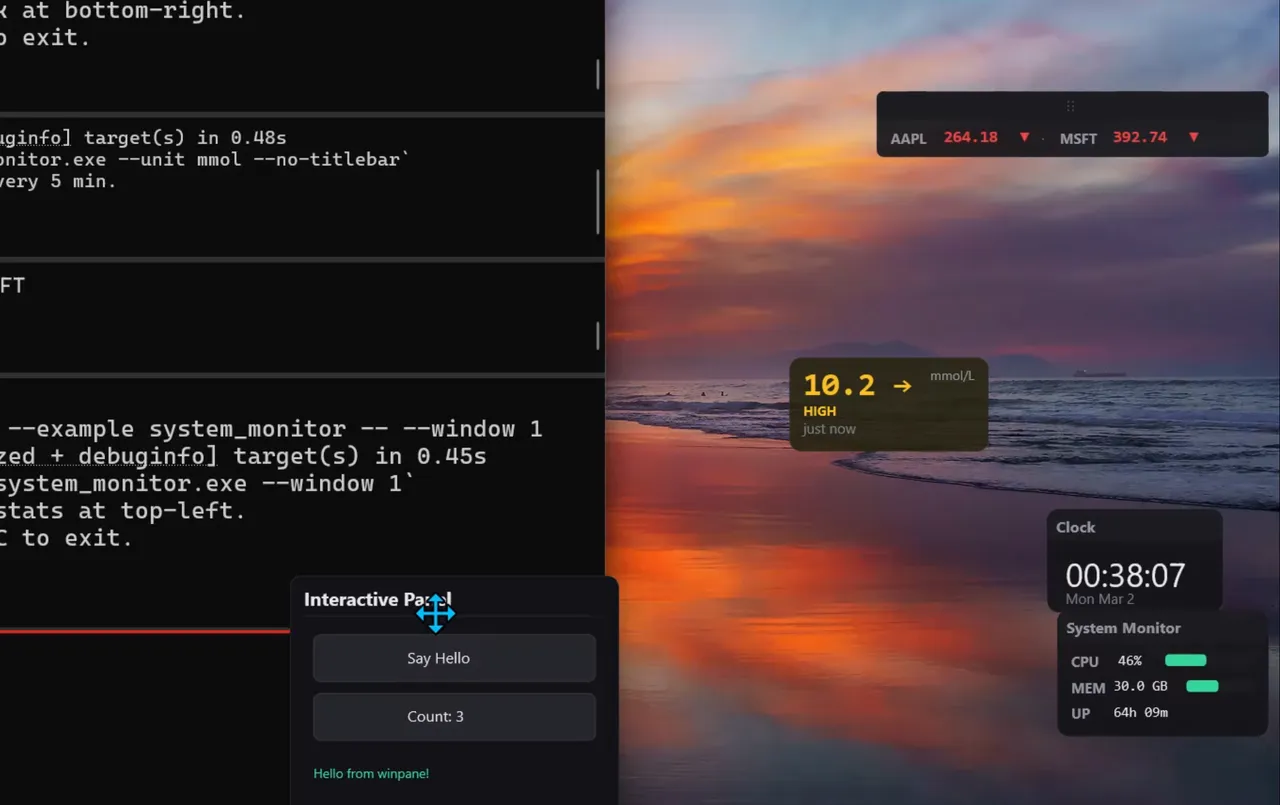
Try it
Section titled “Try it”Examples are draggable, remember their position, and default to the bottom-right corner. Most support --no-titlebar, --position X,Y, --monitor N, and more — run any example with --help to see its flags.
cargo run -p winpane --example clock_overlaycargo run -p winpane --example countdown_timercargo run -p winpane --example system_monitor -- --no-titlebarcargo run -p winpane --example stock_ticker -- --monitor 1cargo run -p winpane --example glucose_monitor -- --demo --unit mmol --no-titlebarcargo run -p winpane --example capture_excluded -- --position 100,100
# see all flags for any examplecargo run -p winpane --example clock_overlay -- --help
pip_viewer and anchored_companion look for an open Notepad or Calculator window. All examples run without configuration — network-dependent ones fall back to simulated data.
All examples
| Example | What it does |
|---|---|
clock_overlay | Live desktop clock, updates every second |
glucose_monitor | CGM overlay — polls Nightscout or uses simulated data |
stock_ticker | Stock prices with live/simulated data |
countdown_timer | Interactive timer with Start/Reset buttons |
system_monitor | Real CPU and memory usage |
color_picker | Pixel color under cursor, updated live |
sticky_notes | Floating notes, toggled via tray icon |
interactive_panel | Clickable buttons, hover effects, drag |
tray_ticker | System tray icon with popup panel |
pip_viewer | Live thumbnail of another window |
anchored_companion | Panel that follows another window |
hud_demo | Basic stats overlay |
backdrop_demo | Mica / Acrylic backdrop effects (Win11) |
fade_demo | Fade-in / fade-out animations |
capture_excluded | Overlay hidden from screen capture |
custom_draw | Procedural D2D drawing |
Run any Rust example: cargo run -p winpane --example <name>. Some examples may be buggy, please report issues, contributions welcome!
TypeScript
Section titled “TypeScript”examples/typescript/: clock_overlay.ts, glucose_monitor.ts, pomodoro.ts, sticky_notes.ts, stock_ticker.ts
Run: npx tsx examples/typescript/<name>.ts (requires addon built; see TypeScript guide)
Python (JSON-RPC)
Section titled “Python (JSON-RPC)”examples/python/: clock_overlay.py, glucose_monitor.py, hud_demo.py
Run: python examples/python/<name>.py (requires winpane-host built; see Python guide)
Node.js
Section titled “Node.js”examples/node/: backdrop_demo.js, hud_demo.js, interactive_panel.js
Run: node examples/node/<name>.js (requires addon built; see Node.js guide)
examples/c/: custom_draw.c, hello_hud.c
See build.bat or CMakeLists.txt for build instructions.
What it does
Section titled “What it does”- Transparent always-on-top windows via DirectComposition — no GDI, no process injection
- GPU-accelerated rendering: D3D11 → DXGI swap chain → D2D device context → DirectComposition visual
- Retained-mode scene graph — add rects, text, images; winpane handles the draw loop
- Multi-language: Rust API, Node.js addon (napi-rs), C ABI (cbindgen), JSON-RPC CLI for Python/Go/Zig/anything
- Built-in DPI awareness, capture exclusion, Mica/Acrylic backdrops, fade animations, system tray, drag, hit testing
What it does NOT
Section titled “What it does NOT”Not a UI framework. No layout engine, no CSS, no widgets. You position elements with x/y coordinates.
Not cross-platform. Windows only, by design. Uses DirectComposition, which has no equivalent on other operating systems.
Not a game render-loop hook. DirectComposition composites outside the game process, adding 1–3 ms. Fine for MMO dashboards, strategy game tools, or any overlay where a couple of milliseconds don’t matter. Competitive twitch shooters that need sub-frame precision typically inject into the render pipeline instead.
Surface types
Section titled “Surface types”| Type | Behavior | Use case |
|---|---|---|
| Hud | Click-through, topmost, no taskbar entry | Stats overlays, notifications, timers |
| Panel | Interactive — hit testing, click/hover events, drag | Tool palettes, floating controls, popups |
| Pip | Live DWM thumbnail of another window | Preview panels, reference windows |
| Tray | System tray icon with popup panel and context menu | Background app controls, status indicators |
These compose together — a tray icon can toggle a panel, a panel can anchor to another window, any surface can fade and exclude itself from screenshots.
Install
Section titled “Install”cargo add winpaneNode.js / Bun
Section titled “Node.js / Bun”npm install winpaneC / C++
Section titled “C / C++”Link against winpane_ffi.dll and include winpane.h (generated by cbindgen). Build the DLL:
cargo build -p winpane-ffi --releaseAny language
Section titled “Any language”Spawn the winpane-host CLI binary, talk JSON-RPC 2.0 over stdin/stdout. Build:
cargo build -p winpane-host --releaseQuick start
Section titled “Quick start”import { WinPane } from "winpane";
const wp = new WinPane();const hud = wp.createHud({ width: 300, height: 100, x: 100, y: 100 });
wp.setRect(hud, "bg", { x: 0, y: 0, width: 300, height: 100, fill: "#14141ec8", cornerRadius: 8,});wp.setText(hud, "msg", { text: "Hello from winpane", x: 16, y: 16, fontSize: 18,});wp.show(hud);This creates a transparent, click-through overlay at (100, 100) with a rounded dark background and white text. The surface stays on top of all windows, invisible to screen capture if you want it to be.
If building from source, see the TypeScript guide.
Guides
Section titled “Guides”- Rust
- Node.js
- TypeScript / JavaScript
- C / C++
- Go
- Zig
- Python / any language (JSON-RPC)
- Cookbook — 10 self-contained recipes
Reference
Section titled “Reference”- Design overview — architecture, key decisions
- JSON-RPC protocol — full method reference for
winpane-host - Limitations — known constraints and workarounds
- Signing and distribution — code signing, SmartScreen, MSIX
Platform
Section titled “Platform”- Windows 10 version 1903 or later
- Windows 11 22H2+ for backdrop effects (Mica, Acrylic)
- Windows 10 2004+ for capture exclusion
Status
Section titled “Status”Pre-1.0. The API works and examples run, but expect breaking changes. Bug reports and feedback welcome.
Why I built this
Section titled “Why I built this”I was diagnosed with Type 1 diabetes in 2025. Most CGM apps are geolocked and unavailable in Kenya, so I built mysukari.com — a free platform that connects any CGM via Nightscout for reporting (view my dashboard) and analysis. I wanted a small desktop overlay showing my glucose reading and trend arrow, updating every few minutes, hidden from screen shares. Nothing lightweight and multi-language existed, so I built winpane.
I had no prior experience with DirectComposition, Direct2D, or Win32 GPU rendering. GitHub Copilot with Claude Opus 4.6 was instrumental in building this.
License
Section titled “License”MIT